This guide will walk you through how to start a Shopify store in 2026 from scratch. The platform has matured significantly — setup that used to take days now takes hours. But the internet is full of outdated tutorials and affiliate-driven advice that glosses over the parts that actually matter. This guide tries to be honest about what's simple, what takes effort, and what most beginners get wrong.
Follow these steps in order and you'll have a functional store by the end.
Step 1: Start Your Shopify Trial
Go to Shopify.com and start the free trial. As of 2026, Shopify offers a 3-day free trial followed by a promotional period — $1/month for the first 3 months. This makes it genuinely low-risk to test whether the platform works for you before committing to the full price.
You don't need a credit card to start the trial. During signup, Shopify will ask what you're selling and your experience level — answer honestly, it personalizes your onboarding dashboard.
Which plan? Basic ($39/month after the promotional period) covers everything you need at the start. There's no reason to pay for higher plans until you understand exactly which features you're missing.
Step 2: Handle the Essentials Before Anything Else
Before touching the design or adding products, go to Settings and complete three things:
- Payments: Connect Shopify Payments or PayPal. Without this, you can't receive money.
- Shipping: Set your shipping zones and rates. A simple flat rate or free shipping over a threshold works for most stores starting out.
- Taxes: Shopify handles this automatically based on your location — just verify the settings are correct.
These three settings are what make your store actually functional. Everything else is optional until they're done.
Step 3: Choose a Theme and Don't Overthink It
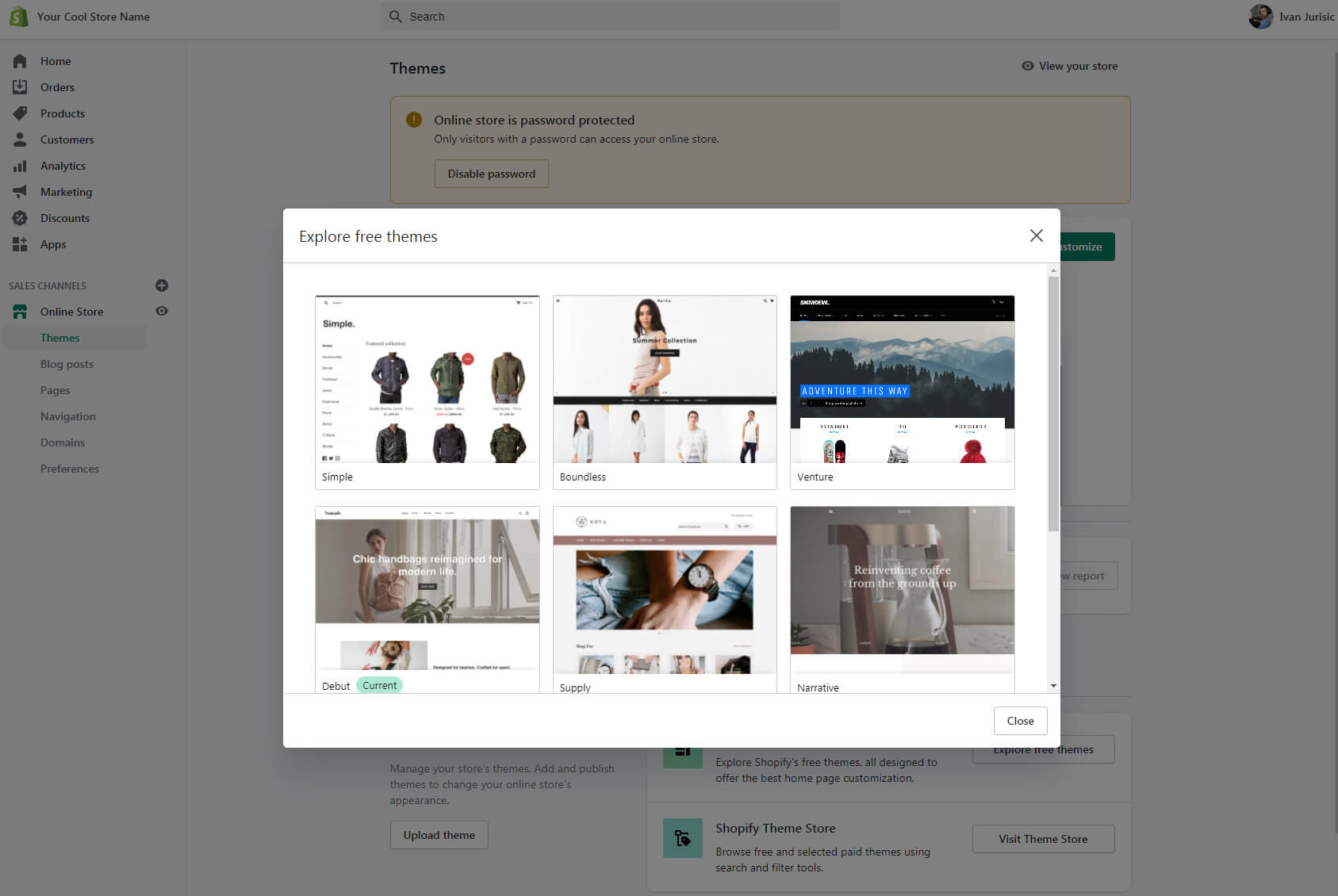
Go to Online Store → Themes. Shopify's free themes — particularly Dawn — are well-designed and fast. Most successful stores run on free themes.
Customize the basics: colors, fonts, logo, homepage layout. Aim to spend 2-3 hours here, not 2-3 days. A store that launches with a simple theme in week one will always outperform a store still being designed in month two. Design is something you improve after you understand what your customers respond to — not before.
Step 4: Add Your Products
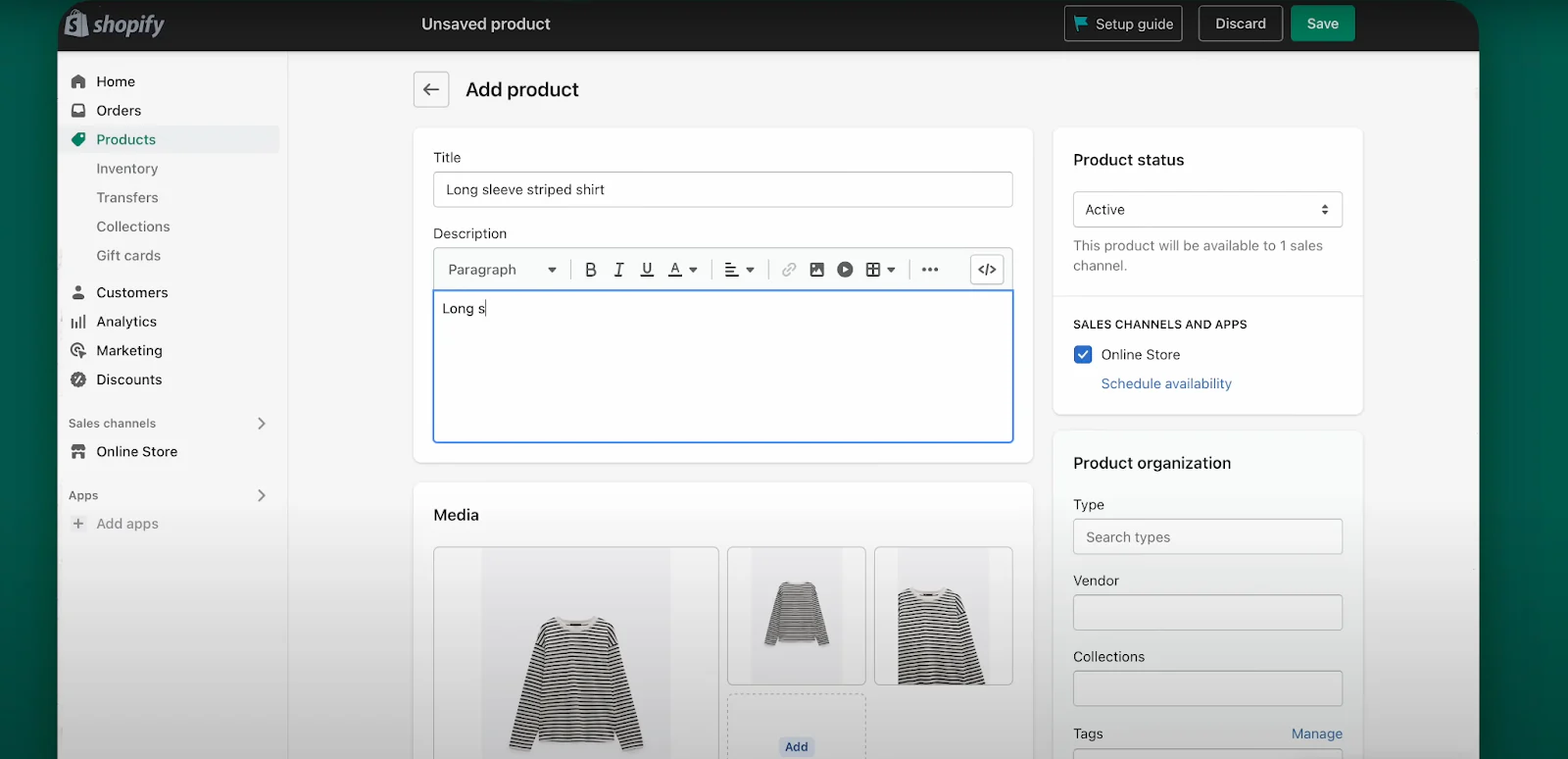
Go to Products → Add product. For each product:
- Title: Clear and descriptive. What is it, who is it for.
- Description: Focus on benefits, not just features. How does it improve the customer's situation?
- Photos: This matters more than most people expect. Customers can't touch or try your products — your photos carry the entire sensory experience. Clean background, good lighting, multiple angles. If your photos are weak, fix them before anything else.
- Price: Research what similar products sell for. Factor in your costs and margins honestly.
On product photography: you don't need professional equipment. A modern smartphone with good natural lighting and a clean white background produces better results than a rushed professional shoot. What you do need is time and patience to get the angles right.
Step 5: Get a Proper Domain
Your store launches at a `.myshopify.com` address. Go to Settings → Domains to connect a custom domain. You can buy one through Shopify ($14-20/year) or connect one you already own.
A `.com` is the standard choice. Keep it short and easy to remember. If your first choice isn't available, try variations — but don't settle for something confusing or hard to spell.
Step 6: Create the Pages Customers Look For
Before launching, create these pages under Online Store → Pages:
- About Us — who you are and why this store exists
- Contact — how customers can reach you
- Shipping Policy — delivery times, rates, countries
- Refund Policy — your returns process
- Privacy Policy — Shopify generates this automatically
Customers check these pages when they're deciding whether to trust a new store. Missing or vague policies are a common reason people abandon checkout — not because they want to return something, but because the absence of a policy signals an unprofessional operation.
Step 7: Install a Few Apps — Just a Few
Three apps make a real difference from day one. Start with these and nothing else:
- Reviews: Judge.me — free, unlimited review requests, Google integration
- Email capture: Privy — captures emails from visitors before they leave
- Live chat: Tidio — answers questions that would otherwise block a sale
Add more apps only when you have a specific, measurable problem to solve. More apps means more code, slower pages, and more monthly cost. Our guide on how to choose Shopify apps explains the framework we use.
Step 8: Set Up Basic Tracking
Before sending any traffic to your store, you need to know what visitors are doing.
- Google Analytics 4: Go to Settings → Customer events and add your GA4 tracking ID. Free, essential.
- Google Search Console: Verify your domain at search.google.com/search-console. This tells Google your store exists and lets you monitor search traffic over time.
Step 9: Get Your First Visitors
A store with no traffic makes no sales, regardless of how well it's built. A few practical starting points:
- Share with your personal network — first customers often come from people who already know you
- Set up Google Merchant Center for free product listings in Google Shopping
- Test a small paid ad ($20-30) to a specific audience — the goal is learning what resonates, not profit
- Start writing content about topics your customers search for — this compounds over time
A Few Things Worth Knowing Before You Start
Most Shopify tutorials don't mention these, but they come up quickly for almost everyone:
- Shopify charges transaction fees if you don't use Shopify Payments (0.5%-2% depending on plan). If you're using a third-party payment processor, factor this into your margins.
- The $1/month promotional pricing ends. After the first 3 months, the full plan price applies. Make sure your business model works at the real price.
- Page speed matters. Every app you install adds load time. Check your PageSpeed score before and after adding new tools.
- Shopify's built-in features cover more than most people realize. Check whether Shopify can already do something before paying for an app to do it.
Starting a store is straightforward. Building a store that actually makes money requires consistency, honest product-market fit, and the patience to improve based on what you learn from real customers — not from more setup.